
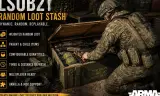
Loot Stashes adds configurable, refreshable loot containers to Arma Reforger, with in-game GM tools to build custom loot pools, link child items, tune spawn rates, and save server-side presets easily.
Players now
20
Servers
30
Rating
86%
7 votes
Subscribers
-
2,791 downloads
Busiest servers running it 30 in total
All servers Brazil
1.8.0.13
Brazil
1.8.0.13
 United States
1.8.0.13
United States
1.8.0.13
United States
1.8.0.13
United States
1.8.0.13
United States
1.8.0.13
United States
1.8.0.13
United States
1.8.0.13
United States
1.8.0.13
United States
1.8.0.13
United States
1.8.0.13
United States
1.8.0.13
United States
1.8.0.13

 Germany
1.8.0.13
United States
1.8.0.13
United States
1.8.0.13
Germany
1.8.0.13
United States
1.8.0.13
United States
1.8.0.13
Players on servers with it
daily, last 30 days
Details
- Author
- OnlyBans21
- Version
- 0.0.16
- Size
- 26.0 MB
- Licence
- APL-SA
- Game version
- 1.8.0.10
- Likes
- 0 / 0 dislikes
- Published
- 25 Jul 2026
- Updated
- 1 month ago
- Workshop ID
- 69E53C9A0D2CCFA1
Recent adoption
30 days: +96 −85 ↑0
- + [NA] Official Survival Syndicate pvpve[Dayz/New/Trader/Banking/dynamic ai 0.0.16 5h ago
- + [GK] PvE 0.0.16 5h ago
- − [BY] KTA 0.0.16 5h ago
- − [GK] PvE 0.0.16 5h ago
- + [GK] PvE 0.0.16 6h ago
- − [GK] PvE 0.0.16 7h ago
- + Official Test Server CM 0.0.16 13h ago
- + Angel Military 0.0.16 22h ago
- + Strykers - Arquipélago Estratégico - Aliança Elite BR 0.0.16 1d ago
- − [EU1] IDZ | Project Outbreak: Deadwood | PvE | New Player Friendly | dsc.gg/idz-battalion 0.0.16 1d ago
- − [NA] Official Survival Syndicate pvpve[Dayz/New/Trader/Banking/dynamic ai 0.0.16 1d ago
- + AFTER THE FALL | RP MILSIM 0.0.16 1d ago
Required by
2

Often used with
8




Version history
10-
v0.0.16 26.0 MB 22 Aug 2026
Random Stash Spawner is a prefab for tools.
-
v0.0.15 26.0 MB 22 Aug 2026
-
v0.0.14 26.0 MB 13 Aug 2026
-
v0.0.13 26.0 MB 9 Aug 2026
-
v0.0.12 26.0 MB 8 Aug 2026
-
v0.0.11 26.0 MB 7 Aug 2026
Description from the Workshop
Loot Stashes Loot Stashes adds configurable loot containers to Arma Reforger. Every stash can generate a randomized selection of weapons, equipment, medical supplies, ammunition, and other arsenal items. The mod includes a complete in-game Game Master editor, allowing GMs to customize individual stashes while a scenario is running—without rebuilding the scenario or editing configuration files. How it works Each Loot Stash uses a customizable loot pool made from two types of entries: Parent items: The main items selected for spawning, such as weapons, equipment, or medical supplies. Linked child items: Optional items attached to a parent entry, such as magazines, optics, grenades, or accessories. Each parent item supports: Spawn weight Minimum quantity Maximum quantity Separate child items for each spawned parent Each linked child item supports: Spawn chance Minimum quantity Maximum quantity Quantity settings are limited to a maximum of 10 per entry to help prevent accidental performance problems caused by spawning excessive numbers of items. Changes are queued safely and take effect the next time the stash refreshes. Using the Game Master editor While playing as a Game Master: Select an editable Loot Stash. Open Edit Properties. Open the Loot Stash settings. Select Manage Loot Pool. Search or browse the loaded arsenal items. Add items as parents or link them as child items. Adjust their weight, chance, and quantity settings. Select Apply for Next Refresh. The editor includes item names, attachment information, prefab previews, search filtering, scrolling lists, and clearly separated parent and child settings. You can add or remove as many entries as needed within the mod’s safety limits. Server-side presets GMs can save complete loot pools as named server presets. Presets include: Every parent item All linked child items Spawn weights and chances Minimum and maximum quantities Child spawning behavior Saved presets can be loaded into another stash, reviewed, adjusted...