
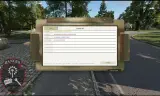
This modification adds writable and shared fields to a Wristmap/Wristcoach. It syncs to all players wearing one, allowing operation information to be shared and retain.
Players now
2
Servers
59
Rating
100%
2 votes
Subscribers
-
4,194 downloads
Busiest servers running it 59 in total
All servers United States
1.8.0.13
United States
1.8.0.13
United States
1.8.0.13
United States
1.8.0.13

 Germany
1.8.0.13
Germany
1.8.0.13
United States
1.8.0.13
United States
1.8.0.13
United States
1.8.0.13
United States
1.8.0.13
Germany
1.8.0.13
Germany
1.8.0.13
United States
1.8.0.13
United States
1.8.0.13
United States
1.8.0.13
United States
1.8.0.13
 United Kingdom
1.8.0.13
United States
1.8.0.13
United Kingdom
1.8.0.13
United States
1.8.0.13
Players on servers with it
daily, last 30 days
Details
- Author
- krihelion
- Version
- 1.0.11
- Size
- 1.1 MB
- Licence
- APL-ND
- Game version
- 1.7.0.54
- Likes
- 0 / 0 dislikes
- Published
- 6 Jul 2026
- Updated
- 2 months ago
- Workshop ID
- 696ADB5B831F4627
Recent adoption
30 days: +111 −110 ↑0
- + Warfighter Development Group TEST SERVER | Milsim Ops 1.0.11 8h ago
- + - The Increment - 1.0.11 17h ago
- + - The Increment 02 - 1.0.11 22h ago
- + DAGR Company Training 1.0.11 1d ago
- − 2 Battalion, Royal Anglian Regiment | discord.gg/2ranglian 1.0.11 1d ago
- + Sinners 1.0.11 2d ago
- + The Boys 1.0.11 2d ago
- + Comrade 1.0.11 2d ago
- + Peanut 1.0.11 2d ago
- − Apex Joint Operation | MilSim Server DE 1.0.11 2d ago
- − Peanut 1.0.11 2d ago
- − E-Squadron Training Area 1.0.11 2d ago
Requires
2
Required by
7




Often used with
8
Version history
10-
v1.0.11 1.1 MB 30 Jul 2026
**Wrist Map** - Added Group Only Card - Displays to the users' group only. - Added the ability to rename card titles ingame. These do not survive restart. For that function, use the server-side JSON. **Admin Feature** - Added the ability to utilize the wristmap within the map. It is condensed 75% into the bottom left. Click the map, or wristmap to return focus on each. Full function is retained for both.
-
v1.0.10 1.1 MB 15 Jul 2026
-
v1.0.9 1.1 MB 15 Jul 2026
-
v1.0.8 1.1 MB 15 Jul 2026
-
v1.0.7 1.1 MB 7 Jul 2026
-
v1.0.6 1.1 MB 7 Jul 2026
Description from the Workshop
Report any issues, comments or concerns to our modding discord: https://discord.gg/tqecVnfqCv This extends the USASOCWristMaps mod by adding fillable and viewable fields to a pop-out display. All credits to that author for the item. This mod comes with no animations. It is GUI driven. The WristMap item is found in Extra3. The mod comes pre-packaged with empty cards such as: TTLODAC Phase Lines Commo Card Notes The Notes sheet does not share between players. All fields can be edited and recolored, and update in real time. Outside of the full-screen edit, a small popout can be accessed that displays information in the bottom left of your screen. There are two keybinds (Default NUM4+6) to cycle through them in the small view. The order of the cards can be programmed via the UP/DOWN keys on the drop down. All keybinds are configurable through the menu. The outside texture may be edited via SETTINGS between MC/Black. On the Server Side, you will find an editable WristmapDefaults inside \profiles\. Through here, you may edit the starting fields, card names, and even repopulate them. Additionally, edit permissions can be made to be admin only or whitelisted by PID.