
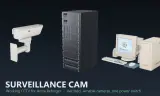
A CCTV system that actually works: cameras that sweep and can be aimed, a 90s desk terminal with the live feed on its own CRT, and a server rack whose switch takes it all offline.
Players now
4
Servers
26
Rating
90%
10 votes
Subscribers
-
871 downloads
Busiest servers running it 26 in total
All servers United States
1.8.0.13
United States
1.8.0.13
United States
1.8.0.13
United States
1.8.0.13
United States
1.8.0.13
United States
1.8.0.13
United States
1.8.0.13
United States
1.8.0.13
United States
1.8.0.13
United States
1.8.0.13

 Germany
1.8.0.13
Germany
1.8.0.13
Germany
1.8.0.13
Germany
1.8.0.13
 Spain
1.8.0.13
Spain
1.8.0.13
 Armenia
1.8.0.13
United States
1.8.0.13
Armenia
1.8.0.13
United States
1.8.0.13
Players on servers with it
daily, last 30 days
Details
- Author
- 9aniin
- Version
- 1.0.0
- Size
- 16.2 MB
- Licence
- APL
- Game version
- 1.8.0.13
- Likes
- 0 / 0 dislikes
- Published
- 9 Sep 2026
- Updated
- 1 month ago
- Workshop ID
- 6A525256C15A86CB
Recent adoption
30 days: +72 −65 ↑0
- − [ID] TACGRU SOF 6th | TAKISTAN PVE ULTRA HARDCORE 1.0.0 1d ago
- − The Royal Yorkshire Regiment | 1YORKS | https://discord.gg/57bhedgagu 1.0.0 2d ago
- − [FR] dernier rempart [PS5 /Xbox/ PC] 1.0.0 2d ago
- + Operaciones Especiales MX 1.0.0 3d ago
- + [FR] dernier rempart [PS5 /Xbox/ PC] 1.0.0 3d ago
- − PUBLIC OPERATIONS 1.0.0 3d ago
- + KDK Testserver 1.0.0 4d ago
- − [PL] #1 Monolith Angels 1.0.0 4d ago
- − [5SFG] 5th Special Forces Group | CTAC | https://discord.gg/PYXudFrjbu 1.0.0 5d ago
- + [ID] TACGRU SOF 6th | TAKISTAN PVE ULTRA HARDCORE 1.0.0 5d ago
- + CLAW MILSIM 1 1.0.0 6d ago
- + [GER/DE] WolfRot | ChillSim RP | Testserver | https://discord.gg/Y7nkFT6vDA 1.0.0 6d ago
Required by
7






Often used with
8







Version history
1-
v1.0.0 16.2 MB 9 Sep 2026
Description from the Workshop
Three props that work together as one surveillance system. WHAT IS IN IT - Surveillance Camera - wall-mounted, sweeps back and forth on its own, with a motor you can hear while it turns. Any terminal can take it over and aim it. - Server Rack - runs the system. Hold the switch to take every camera and screen offline, hold again to bring them back. - CCTV Terminal (90s desktop PC) - the live camera picture plays on the CRT itself, not in a menu, with the channel number and location drawn over it. USING IT At the PC: Next camera step to the next channel on the screen Watch cameras put yourself behind the lens While looking through a camera: Q / E turn left and right W / S tilt up and down R next camera Space back to yourself The readout says which camera you are on and where it stands. A camera with no location typed into it describes itself by range and bearing from the terminal, so it says something useful without any setting up. THE POWER SWITCH Hold the switch on the rack. Every camera stops where it stands, every screen reads SYSTEM IS DOWN, and anyone looking through a camera is dropped out of it. Hold it again and the racks spin back up - the screens wait for the system to come up before showing a picture, then return to the channel they were left on. Every rack in a world is one system, so any one of them switches the lot. SETTING IT UP Place the props from the Game Master. Cameras link to a terminal by themselves within 300 m - no wiring, no lists to fill in - and cameras placed later join on their own within a few seconds. Per camera: channel number, location name, sweep width and speed, and how far it may turn. Per terminal: search radius, field of view, and which world camera slot its screen uses - give a second screen its own slot. NOTES - Sound is local, like every other prop sound in the game. A dedicated server plays nothing and needs nothing. - One screen is one extra pass over the scene, the same cost...