
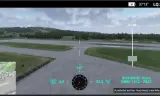
Laser designator for Realistic Combat Drones, marking targets for any aircraft that uses the SOFLAM Integration Core.
Players now
18
Servers
5
Rating
-
Subscribers
-
202 downloads
Busiest servers running it 5 in total
All servers United States
1.8.0.13
United States
1.8.0.13
United States
1.8.0.13
United States
1.8.0.13
 Germany
1.8.0.13
Germany
1.8.0.13
Germany
1.8.0.13
Germany
1.8.0.13
 Canada
1.8.0.13
Canada
1.8.0.13
Players on servers with it
daily, last 30 days
Details
- Author
- Seebie90 I Nomad
- Version
- 0.0.3
- Size
- 13 KB
- Licence
- APL
- Game version
- 1.8.0.13
- Likes
- 0 / 0 dislikes
- Published
- 2 Aug 2026
- Updated
- 1 month ago
- Workshop ID
- 6A04FAA03CA3AD18
Recent adoption
30 days: +19 −13 ↑0
- − UNSC TEST 0.0.3 2h ago
- − Jaguar | Asia | Operations 0.0.3 1d ago
- − 12th Battalion 75th Ranger Regiment | Public Operations | Discord Code: 8QzZ9XhgCJ 0.0.3 4d ago
- + Jaguar | DEV | TESTING 0.0.3 5d ago
- − Jaguar | DEV | TESTING 0.0.3 6d ago
- − 秘密地牢|牢大在打复活赛 0.0.3 1w ago
- + 秘密地牢|牢大在打复活赛 0.0.3 1w ago
- − [Beta] Le labo de Darckalex 0.0.3 1w ago
- + Jaguar | DEV | TESTING 0.0.3 1w ago
- + 12th Battalion 75th Ranger Regiment | Public Operations | Discord Code: 8QzZ9XhgCJ 0.0.3 1w ago
- − Pathfinder Platoon Training Server | UK Milsim | Join Our Discord: https://discord.gg/evKAa8eMzk 0.0.3 1w ago
- + UNSC TEST 0.0.3 2w ago
Requires
2
Often used with
8


Version history
3-
v0.0.3 13 KB 10 Sep 2026
# Drone Laser Code Addon — Changelog ## IMPORTANT — THIS VERSION NEEDS A DIFFERENT DEPENDENCY RVX Core is no longer required. This addon now needs **SOFLAM Integration Core** instead. Please subscribe to it before updating, or the addon will not load. **WCS_Armaments is no longer a dependency of this addon.** It still ships with the aircraft mods that need it. ### Why RVX Core stopped compiling with current WCS Armaments. One call in `RVX_WCS_LoadoutOverrides.c` still uses the old signature of `CreateWeaponQueueClient`. In Reforger every loaded mod is compiled into one shared script module, so that single error takes the whole module down - your server starts, but the game logic is gone. It cannot be patched from another mod either, because patch code only becomes active after a successful compile, and the compile is what fails. This addon was hit directly: it registered its laser targets through three methods RVX hangs on the player character (`SpawnLaserTarget` / `UpdateLaserTargetPosAndCode` / `DeleteLaserTarget`). Without RVX loaded the compiler does not know them, and the addon stops building. ## What changed Only the registration path. Everything you actually touch is unchanged. - **Same button.** Still the camera laser / rangefinder button, left mouse button by default. A separate key was tried during development and dropped again - the shared button had never been the problem. - **Same behaviour.** One press on, one press off, red diamond while running, the mark held when you look away, cleared automatically when you leave the drone. - **Same laser code**, 1111. Under the hood the three RVX calls were replaced by our own relay into the Core's target registry. The network path is the same one the handheld SOFLAM uses: the client asks the server, the server writes the target and broadcasts it to everyone. The message travels on the operator's own character, because the drone belongs to the server and a client can only send from something it owns. ## Verified in a test flight - Target registered and removed cleanly across three on/off cycles. - Marked point landed on the aimed geometry: a shed wall 828 m out, reported position matching the building to within centimetres, stable over minutes. - The mark showed up in the AH-64 gunner's sight, and missiles hit it. ## Also in this build - Debug logging off. Only two messages remain, both real failures: the HUD layout failing to load, and the marker widget missing from it. A missing layout leaves no other clue.
-
v0.0.2 9 KB 6 Aug 2026
-
v0.0.1 5 KB 2 Aug 2026
Description from the Workshop
Turns a Realistic Combat Drones drone into a laser designator. The drone operator marks a target from the air, an aircraft with laser-guided weapons takes the shot. REQUIREMENTS - Realistic Combat Drones (SalamiBoiDev) - SOFLAM Integration Core <- REQUIRED, please subscribe RVX Core is no longer used. It stopped compiling with current WCS Armaments, and in Reforger a single failing mod takes the whole script module down - your server starts, but the game logic is gone. Everything this addon used from RVX now lives in our own Core. WCS_Armaments is no longer a dependency of this addon either. It still comes with the aircraft mods that need it. The addon runs on its own, but a mark is only useful to someone who can act on it. Aircraft that read the same target registry: - GTG SOFLAME AH-64D Integration - Sages AH-1Z SOFLAM Integration HOW TO USE 1. Connect to a drone as usual. 2. Aim with the drone camera and press the camera laser button - the same one the rangefinder uses (left mouse button by default). No extra key. 3. One press turns the laser ON and it stays on. Press again to turn it off. A red diamond in the middle of the camera view shows it is running. 4. The aircraft has to be set to the same laser code. The drone sends 1111. Designation reaches out to 1000 m from the drone camera. Terrain, buildings and vehicles all work as targets. The mark is HELD when you stop looking through the drone camera - climb into a gunship to take the shot yourself and the point stays where you put it. Leave the drone or lose ownership of it and the mark is cleared for you, so nothing stays behind on the map. CREDITS - SalamiBoiDev for Realistic Combat Drones This addon would not exist without your work. STATUS Work in progress, and honestly so. Designation, hand-off and guidance are verified in flight; anything beyond that is still being built. CONTACT Questions and bug reports are welcome. - Arma Reforger Discord: Seebie90 - GTG Discord: Seebie90...