
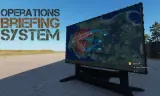
The Operations Briefing System (OBS) provides commanders and units with a structured platform for mission planning, situational awareness, and display of operational data directly in the field.
Players now
57
Servers
48
Rating
100%
15 votes
Subscribers
-
7,837 downloads
Busiest servers running it 48 in total
All servers
 France
1.8.0.13
France
1.8.0.13

 Germany
1.8.0.13
Germany
1.8.0.13
 United Kingdom
1.8.0.13
United Kingdom
1.8.0.13
United Kingdom
1.8.0.13
United Kingdom
1.8.0.13
 United States
1.8.0.13
France
1.8.0.13
United States
1.8.0.13
France
1.8.0.13
 France
1.8.0.13
United States
1.8.0.13
France
1.8.0.13
France
1.8.0.13
United States
1.8.0.13
France
1.8.0.13
 Spain
1.8.0.13
Spain
1.8.0.13
Players on servers with it
daily, last 30 days
Details
- Author
- Faldi
- Version
- 1.1.5
- Size
- 15.5 MB
- Licence
- APL-ND
- Game version
- 1.8.0.13
- Likes
- 0 / 0 dislikes
- Published
- 12 Apr 2026
- Updated
- 1 month ago
- Workshop ID
- 68E13DB914127404
Recent adoption
30 days: +117 −104 ↑33
- + [TH] USASOC & JSOC - PROJECT MISSION MILSIM - TSOG 1.1.5 9h ago
- + Warfighter Development Group TEST SERVER | Milsim Ops 1.1.5 15h ago
- + 22 G Squadron Ops 1.1.5 1d ago
- + SpearHead Milsim 1.1.5 1d ago
- − [FR] Groupe d'Opérations de l'Armée Française | DEV | https://discord.gg/goaf 1.1.5 2d ago
- − [TH] USASOC & JSOC - PROJECT MISSION MILSIM - TSOG 1.1.5 2d ago
- − Odyssey international 1.1.5 2d ago
- + Odyssey international 1.1.5 2d ago
- − [LATAMSQUAD] DIVISION RANGER LATAM MILSIM 24/7 1.1.5 2d ago
- − VSG-ITA Veteran Sim Group 1.1.5 3d ago
- + [LATAMSQUAD] DIVISION RANGER LATAM MILSIM 24/7 1.1.5 3d ago
- − [LATAMSQUAD] DIVISION RANGER LATAM MILSIM 24/7 1.1.5 3d ago
Required by
81





Often used with
8






Version history
9-
v1.1.5 15.5 MB 16 Sep 2026
ADDED: - N/A FIXED: - OBS Gamesystem does not get initializied UPDATED: - N/A DELETED: - N/A
-
v1.1.4 15.5 MB 21 Jul 2026
-
v1.1.3 15.5 MB 9 May 2026
-
v1.1.2 15.5 MB 6 May 2026
-
v1.1.1 15.5 MB 30 Apr 2026
-
v1.1.0 15.5 MB 21 Apr 2026
Description from the Workshop
Current Features - Monitor to display presentations - Ability to switch between multiple presentations - Presentations can be configured global or for a mission on the gamemode - Presentations are configuration files and contain just a list of texutres that get displayed in order - Ability to change the brightness of monitors in GM - Display devices can be grouped, and presentations are displayed per group Hint: The Monitors display the textures on rendertextures which means that the monitors should be turned off if not in use. Textures get scaled to fit the display area, if you wish to avoid stretching your texture should be in the aspect ratio 16:9. Documentation can be found here: https://github.com/Dalfi/Operations-Briefing-System/wiki Credits: - Frankyman for the TV model