
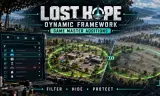
# LHDF Game Master Additions LHDF Game Master Additions gives Game Masters and scenario makers three tools: a Map Entity Hider, Safe Zones, and search, sort and filter in the Game Master entity list.
Players now
3
Servers
3
Rating
-
Subscribers
-
4 downloads
Busiest servers running it 3 in total
All servers
 Germany
1.8.0.13
Germany
1.8.0.13
Germany
1.8.0.13
Germany
1.8.0.13
Germany
1.8.0.13
Germany
1.8.0.13
Players on servers with it
daily, last 30 days
Details
- Author
- Boomstick Barry
- Version
- 1.0.3
- Size
- 3.4 MB
- Licence
- Custom
- Game version
- 1.8.0.13
- Likes
- 0 / 0 dislikes
- Published
- 1 Oct 2026
- Updated
- 2 weeks ago
- Workshop ID
- 32C3D2BD01265D6E
Recent adoption
30 days: +1 −0 ↑16
- + [Lost Hope Survival] Dead Coast | Nizla | PvPvE Zombies & Bandits #3 1.0.10 3d ago
- ↑ [Lost Hope Survival] Dead Coast | Nizla | PvPvE Zombies & Bandits #1 1.0.9 1.0.10 4d ago
- ↑ [Lost Hope Survival] Dead Coast | Nizla | PvPvE Zombies & Bandits #2 1.0.9 1.0.10 4d ago
- ↑ [Lost Hope Survival] Dead Coast | Nizla | PvPvE Zombies & Bandits #1 1.0.8 1.0.9 6d ago
- ↑ [Lost Hope Survival] Dead Coast | Nizla | PvPvE Zombies & Bandits #2 1.0.8 1.0.9 6d ago
- ↑ [Lost Hope Survival] Dead Coast | Nizla | PvPvE Zombies & Bandits #2 1.0.6 1.0.8 6d ago
- ↑ [Lost Hope Survival] Dead Coast | Nizla | PvPvE Zombies & Bandits #1 1.0.6 1.0.8 6d ago
- ↑ [Lost Hope Survival] Dead Coast | Nizla | PvPvE Zombies & Bandits #1 1.0.5 1.0.6 1w ago
- ↑ [Lost Hope Survival] Dead Coast | Nizla | PvPvE Zombies & Bandits #2 1.0.5 1.0.6 1w ago
- ↑ [Lost Hope Survival] Dead Coast | Nizla | PvPvE Zombies & Bandits #1 1.0.4 1.0.5 1w ago
- ↑ [Lost Hope Survival] Dead Coast | Nizla | PvPvE Zombies & Bandits #2 1.0.4 1.0.5 1w ago
- ↑ [Lost Hope Survival] Dead Coast | Nizla | PvPvE Zombies & Bandits #1 1.0.3 1.0.4 2w ago
Requires
1
Often used with
8





Version history
4-
v1.0.3 3.4 MB 1 Oct 2026
-
v1.0.2 3.4 MB 1 Oct 2026
-
v1.0.1 3.4 MB 1 Oct 2026
-
v1.0.0 584 KB 1 Oct 2026
Description from the Workshop
# LHDF Game Master Additions LHDF Game Master Additions gives Game Masters and scenario makers three tools: a Map Entity Hider, Safe Zones, and search, sort and filter in the Game Master entity list. It is part of the Lost Hope Dynamic Framework (LHDF) and builds on LHDF Core. Map Entity Hider and Safe Zone are placeables in the Game Master content browser (under Systems, search "LHDF") and can also be put into a world file in Workbench. Their area is a circle or a rectangle, shown as a border while an editor is open. Every setting is a Game Master attribute. Placed hiders and zones, and changes to ones in the world file, are kept in the vanilla save. ## Features - Map Entity Hider: hides map objects in its area. Types, each a checkbox: buildings, trees, bushes, rocks, walls, wrecks, power lines and other props. Furniture inside hidden buildings can be hidden with them. - Objects come back when the hider is moved, changed or deleted. Overlapping hiders work together. - The work is spread over several frames, and the server rebuilds the AI navmesh of the area once the change is done. - In Workbench the hider previews its effect in the edit world without changing the world file. - Safe Zone: protects its area. Protections, each a checkbox: - players take no damage (and deal none from inside to outside), - vehicles take no damage, - no weapons (no firing, throwing or melee, vehicle turrets included), - no explosives (mines and charges cannot be placed), - remove AI that stays inside, - enter and leave messages, - AI inside takes no damage, - AI cannot hurt players inside. - Protected factions and affected AI factions can be chosen; none checked means all. AI that is switched off (for example shopkeepers) and AI led by players are never removed. - Game Master sizes: hider 5 to 300 m, safe zone 5 to 500 m (radius, or width and length). - Entity list: a search box (by name, while typing), sorting by name, distance to the camera, faction or heal...