
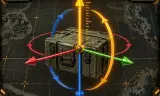
Precise GM placement: axis moves, tilt, surface sticking, magnet modes and numpad nudging. Placement GM précis : axes, inclinaison, collage, aimant et réglage au pavé numérique.
Players now
33
Servers
20
Rating
-
Subscribers
-
150 downloads
Busiest servers running it 20 in total
All servers France
1.8.0.13
France
1.8.0.13
 France
1.8.0.13
France
1.8.0.13
 Europe
1.8.0.13
Europe
1.8.0.13
 United States
1.8.0.13
United States
1.8.0.13
United States
1.8.0.13
United States
1.8.0.13
 Singapore
1.8.0.13
United States
1.8.0.13
United States
1.8.0.13
Singapore
1.8.0.13
United States
1.8.0.13
United States
1.8.0.13
 Germany
1.8.0.13
Germany
1.8.0.13
Players on servers with it
daily, last 30 days
Details
- Author
- felipew4r
- Version
- 1.1.2
- Size
- 31 KB
- Licence
- APL
- Game version
- 1.8.0.13
- Likes
- 0 / 0 dislikes
- Published
- 13 Sep 2026
- Updated
- 2 weeks ago
- Workshop ID
- 27B99420DC33D91A
Recent adoption
30 days: +56 −35 ↑18
- + HLS | 3./InfBtl 232 | PvE Bundeswehr MilSim | https://discord.gg/hlsgaming 1.1.2 3h ago
- − [ExpBG] The Expeditionary Battlegroup - Zeus 1.1.2 4h ago
- + [ExpBG] The Expeditionary Battlegroup - Zeus 1.1.2 8h ago
- + [TH] USASOC & JSOC - PROJECT MISSION MILSIM - TSOG 1.1.2 13h ago
- + Fear The Outbreak 1.1.2 20h ago
- − Fear The Outbreak 1.1.2 21h ago
- + MATRIX GROUP 1.1.2 1d ago
- + Fear The Outbreak 1.1.2 2d ago
- − [TH] USASOC & JSOC - PROJECT MISSION MILSIM - TSOG 1.1.2 2d ago
- + [ITA] | A.D.R.A. Team | MILSIM | PVP/PVE 1.1.2 3d ago
- + JAMU's Training/SideOp Server 1.1.2 3d ago
- + Strike Force Cobra 1.1.2 3d ago
Often used with
8



Version history
6-
v1.1.2 31 KB 26 Sep 2026
-
v1.1.1 30 KB 22 Sep 2026
-
v1.1.0 30 KB 20 Sep 2026
-
v1.0.2 18 KB 17 Sep 2026
-
v1.0.1 16 KB 14 Sep 2026
-
v1.0.0 16 KB 13 Sep 2026
Description from the Workshop
Place objects precisely from the Game Master interface. This mod adds one-axis gestures to the vanilla placement without removing any: Shift (flat rotation) and Alt (height) keep working as usual. No game file is replaced. DRAG — hold left click, then hold C: move left/right along the object's own axis. V: move forward/back along the object's own axis. Ctrl: tilt up/down by moving the mouse vertically. B: stick the back of the object against the surface under the cursor (wall, pole, rock). Shift + B: stick it by its bottom (roof, slope). Tilt and sticking work on objects already placed and on new ones from the entity browser. FINE ADJUSTMENT — select one or more objects, hold a key, tap numpad + or − C / V: left-right / forward-back. Alt: height. Ctrl: tilt. Shift: flat rotation. Hold + or − to repeat. Each selected object moves along its own axes, so a row of crates lines up in one go. STEP SIZE Hold the key and numpad *, then tap + or −. C, V or Alt: move step 1 cm, 5 cm, 10 cm, 25 cm, 50 cm, 1 m, 2 m. Ctrl or Shift: rotation step 1°, 5°, 15°, 45°, 90°. Hold the key and * for 2 seconds to reset to 5 cm / 5°. The new value is shown on screen and your steps are saved in your profile. LEVEL Press N to level the selected objects horizontally, like on water, keeping their heading and position. MAGNET Tap Caps Lock to cycle the vertical placement reference: sea level, terrain or geometry. Hold Caps Lock for 0.6 seconds to toggle automatic snapping. When on, the object snaps to that reference as you release left click; when off, it keeps its exact preview position. Every change is shown. CONTROLS AND FEEDBACK Rebind every action under Options > Controls > GM Axis Placement. Names and messages are available in English and French. Step and magnet changes remain visible when game hints are disabled. GOOD TO KNOW Characters and objects the game keeps upright cannot be tilted or stuck. Fine adjustment and levelling require full Game Master rights and are applied by the...