
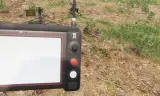
Mortar tablet control in bio
Players now
1
Servers
3
Rating
-
Subscribers
-
24 downloads
Busiest servers running it 3 in total
All servers United States
1.8.0.13
United States
1.8.0.13
United States
1.8.0.13
United States
1.8.0.13
United States
1.8.0.13
United States
1.8.0.13
Players on servers with it
daily, last 30 days
Details
- Author
- _Moskau_
- Version
- 0.0.4
- Size
- 7.9 MB
- Licence
- APL
- Game version
- 1.8.0.13
- Likes
- 0 / 0 dislikes
- Published
- 4 Oct 2026
- Updated
- 1 week ago
- Workshop ID
- 7A3C5D1E00000001
Recent adoption
30 days: +5 −2 ↑0
- + LOFConflict PvE 0.0.4 9h ago
- − Unité Phoenix Event 0.0.4 2d ago
- + Unité Phoenix Event 0.0.4 5d ago
- + SPEAR TAC OPS 0.0.4 5d ago
- + [US/EU] Kill The 2% | RHS | Modern Factions | Paratroops | 0.0.4 1w ago
- + Savannah Command - Operation Phoenix - Halo Arma Server 0.0.4 1w ago
- − Testing Goathost 0.0.2 1w ago
Often used with
8





Version history
4-
v0.0.4 7.9 MB 6 Oct 2026
-
v0.0.3 7.9 MB 6 Oct 2026
-
v0.0.2 7.9 MB 4 Oct 2026
-
v0.0.1 7.9 MB 4 Oct 2026
Description from the Workshop
Mortar tablet just take a look by u self TRK-900 MORTAR TABLET - CONTROLS The tablet shows the map, your target and the firing data for up to 4 mortars. It does NOT fire or aim the mortar for you - the gunner lays the mortar by hand using the values on the tablet. ----------------------------------------- GETTING STARTED ----------------------------------------- 1. Take the "TRK-900 Mortar Tablet" from the arsenal (Equipment). 2. Go to a mortar (2B14 or M252) and select "Connect Mortar Tablet". Repeat for up to 4 mortars (range 1500 m). 3. Equip the tablet and inspect it. Look at the Power switch (right side) and select "Open Tablet". 4. Turn the tablet on: flip the POWER switch, then the SYSTEM switch. The tablet boots and logs in. 5. Move the crosshair onto the target and press ENTER. The firing data appears. 6. Lay the mortar by hand. The mortar list shows how far off it still is (e.g. "AZ +12 EL -5"). When it shows a green "LAID", the mortar is on target. ----------------------------------------- MOUSE & KEYBOARD ----------------------------------------- Click the buttons on the tablet with the mouse. Joysticks: hold the left mouse button on the stick and drag. POWER switch ........ Device on / off SYSTEM switch ....... Boot system (login) ANTENNA switch ...... Radio link to the mortars on / off Power button (top right) ...... Standby (screen off) Sun button (top left) ......... Brightness (10 steps, each press darker) Left joystick ....... Move the map Right joystick ...... Move the crosshair D-pad up / down ..... Select mortar (in menus: select line) D-pad left / right .. Zoom out / zoom in LOCK ................ Zoom in step by step (after the last step back to full map) ENTER ............... Set target at the crosshair REC ................. Save target to the target list MENU ................ Menu (Map, Mortars, Target List, Fire Calculator, Comms) MODE ................ Angles in mils / degrees COMM ................ Comms page (link status, distanc...