
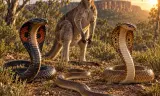
Snakes and kangaroos with reactive vanilla behaviour AI, player possession and a custom GM wildlife spawner and server tool
Players now
0
Servers
3
Rating
100%
2 votes
Subscribers
-
41 downloads
Busiest servers running it 3 in total
All servers


Players on servers with it
daily, last 30 days
Details
- Author
- joshargh
- Version
- 1.0.0
- Size
- 59.8 MB
- Licence
- Custom
- Game version
- 1.8.0.13
- Likes
- 0 / 0 dislikes
- Published
- 15 Oct 2026
- Updated
- 16 hours ago
- Workshop ID
- 6A9AAD0C3019E083
Recent adoption
30 days: +5 −2 ↑1
- ↑ Official Test Server CM 1.0.0 1.0.1 50m ago
- − task force Hades 1.0.0 3h ago
- − Psy Test Server 1.0.0 3h ago
- + Psy Test Server 1.0.0 4h ago
- + [LATAM] FUERZA ELITE |Everon_PvE| SANTI CUBA #1 1.0.0 6h ago
- + Official Test Server CM 1.0.0 10h ago
- + Teletubby Planet 1.0.0 15h ago
- + task force Hades 1.0.0 15h ago
Often used with
8





Version history
1-
v1.0.0 59.8 MB 15 Oct 2026
Description from the Workshop
ARGH FAUNA Bring dangerous wildlife into your Arma Reforger scenarios. Featuring the Eastern Brown Snake, Cobra Variant A, Cobra Variant B and Kangaroo, ARGH Fauna adds roaming animals, reactive combat, player possession and custom creature audio. This is an initial multiplayer test release. Please report issues with the animal type, map and whether you were playing as host, peer or Game Master. CREATURES • Eastern Brown Snake • Cobra Variant A • Cobra Variant B • Kangaroo FEATURES • Reactive AI with roaming, pursuit, threat reactions and close-range attacks. • Venomous snake bites, bleeding and poison effects. • Player possession with light and heavy attacks. • Swimming, water effects and surface-specific movement sounds. • Individual creature thumbnails and Game Master placement. GAME MASTER AMBIENT SPAWNER Place ARGH Ambient Fauna to populate an area with your chosen animals. • Use a radius-based area or draw an open or closed route. • Choose animal types, population limits and pack sizes. • Animals spawn at random valid positions within the area or along the route. • Set loiter times at individual route points. • Assign existing ARGH animals to a zone. • Start or pause spawning through the context menu. • Save and restore zone configurations using server-side save slots. • Route and area guides are restricted to the authorised GM view and hide with the GM interface. Quick setup: place the spawner, open Edit properties, choose your animals and population limit, then start spawning. For routes, enter route editing and Ctrl-click to add points or Ctrl-drag to draw. Ctrl-click the starting point to close a loop, then finish route editing. Pausing stops new spawns. Deleting a zone removes its owned animals, except animals currently controlled by players. POSSESSION CONTROLS W — Move forward A / D — Turn left or right Mouse wheel / Ctrl + mouse wheel — Adjust movement speed Shift — Fastest gait Middle mouse — Quick bite / light attack Left mouse — Heavy stri...