
Command AI squads from the map: move, attack, defend, formations, stances, fire control, vehicles, convoys, and building entry (garrison/clear). Updated for 1.8. PC recommended.
Players now
6
Servers
44
Rating
90%
82 votes
Subscribers
-
12,164 downloads
Busiest servers running it 44 in total
All servers Singapore
1.8.0.13
Singapore
1.8.0.13
 United States
1.8.0.13
United States
1.8.0.13

 France
1.8.0.13
United States
1.8.0.13
France
1.8.0.13
United States
1.8.0.13
 United Kingdom
1.8.0.13
United States
1.8.0.13
United States
1.8.0.13
United States
1.8.0.13
United Kingdom
1.8.0.13
United Kingdom
1.8.0.13
United States
1.8.0.13
United States
1.8.0.13
United States
1.8.0.13
United Kingdom
1.8.0.13
Players on servers with it
daily, last 30 days
Details
- Author
- HOLLOWxPOINT
- Version
- 1.0.8
- Size
- 1.9 MB
- Licence
- APL
- Game version
- 1.8.0.13
- Likes
- 0 / 0 dislikes
- Published
- 18 Jun 2026
- Updated
- 2 weeks ago
- Workshop ID
- 69A404653EE3F3C4
Recent adoption
30 days: +132 −104 ↑106
- − DuckForce 1.0.8 8h ago
- + Big Red Dirty Mike 1.0.8 12h ago
- + Dead Reckoning | USA Operations [PVE] 1.0.8 20h ago
- − |PvE| CONFLICT FUN 1.0.8 1d ago
- − [LATAM]EspañolArmada #3 1.0.8 1d ago
- − [LATAM]EspañolArmada #1 1.0.8 1d ago
- + MORO-4090 overthrow 1.0.8 1d ago
- − MORO-4090 overthrow 1.0.8 1d ago
- + |PvE| CONFLICT FUN 1.0.8 2d ago
- − Fox's server 1.0.8 2d ago
- − COLD WAR BOYYY 1.0.8 2d ago
- − [ITA] Conflict AI Giusco 1.0.8 2d ago
Required by
17




Often used with
8






Version history
9-
v1.0.8 1.9 MB 26 Sep 2026
1.0.8 - Playing as a character now shows only your own faction's squads on the map, even if you have Game Master or admin rights. "Control all factions" still lets everyone see and command every faction. - New Game Master setting: "AAC - Game Master sees all factions" (default on). While the editor is open, choose whether the GM sees every faction's squads or only their own. - New Game Master setting: "AAC - Map icons" (default on). Turn it off to hide everything AAC draws on the map (squad icons, waypoint lines, soldier dots, AAC player markers) for all players. Map commanding is disabled while it's off. Applies live, no need to reopen the map.
-
v1.0.7 1.9 MB 26 Sep 2026
-
v1.0.6 1.9 MB 21 Sep 2026
-
v1.0.5 1.9 MB 21 Sep 2026
-
v1.0.4 1.8 MB 19 Sep 2026
-
v1.0.3 1.8 MB 18 Sep 2026
Description from the Workshop
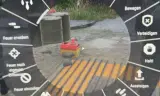
Advanced AI Command (AAC) gives you full control of AI squads straight from the map. Open the map, click a squad, and a clean command menu lets you order moves, set formations and stances, manage behavior, board vehicles, build convoys, and run building assaults. Works in singleplayer, the World Editor, and Game Master. FEATURES Map command menu: click any friendly AI squad and issue orders without leaving the map. Movement orders: Move, Force Move, Attack, Defend, with chained waypoints. Formations: Column, Staggered Column, Wedge, Line, Diamond, Circle, plus an Auto mode that picks a formation from the terrain. Squads hold formation while following and close up tight on the move. Stances: Stand, Crouch, Prone, or Auto (hand stance back to the AI). Behavior: Open Fire or strict Hold Fire (they won't shoot even when shot at). Recruit: pull a whole AI squad under your command. Vehicles: order squads to get in a chosen vehicle or dismount. Attach / Detach: link squads into foot-follow groups or vehicle convoys. Entry: stack on a building's door, breach, and either Garrison (move in and hold) or Clear (every man works the rooms, opening doors). Squads push contacts aggressively instead of turtling. Map readability: live player markers and per-soldier dots for your own squad. AI awareness: soldiers yield to each other to avoid clogging doorways and hallways. HOW TO USE Open the map, click a squad's icon to grab it, pick an order, then click the map or a target to confirm. Hold Ctrl while placing to chain waypoints. WHO CAN COMMAND WHAT By default you command your own faction's AI. A Game Master commands every faction. Hosts who want ordinary players to command across factions can switch on "Control all factions" in Scenario properties, Game tab. It is off by default and can be toggled mid-game. COMPATIBILITY Built for Arma Reforger 1.8. No dependencies. Works in singleplayer and multiplayer. The input config is additive rather than a full override, so mods that...