
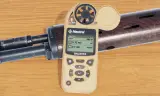
Handheld ballistic weather meter
Players now
1
Servers
24
Rating
100%
5 votes
Subscribers
-
35,194 downloads
Busiest servers running it 24 in total
All servers United States
1.8.0.13
United States
1.8.0.13

 Germany
1.8.0.13
United States
1.8.0.13
Germany
1.8.0.13
United States
1.8.0.13
 Brazil
1.8.0.13
Brazil
1.8.0.13
Brazil
1.8.0.13
Brazil
1.8.0.13
 United Kingdom
1.8.0.13
United Kingdom
1.8.0.13
Germany
1.8.0.13
United States
1.8.0.13
Germany
1.8.0.13
United Kingdom
1.8.0.13
United Kingdom
1.8.0.13
Germany
1.8.0.13
United States
1.8.0.13
Germany
1.8.0.13
Players on servers with it
daily, last 30 days
Details
- Author
- kachakuczka
- Version
- 0.1.52
- Size
- 76.9 MB
- Licence
- APL
- Game version
- 1.8.0.10
- Likes
- 0 / 0 dislikes
- Published
- 22 Jun 2026
- Updated
- 2 months ago
- Workshop ID
- 69A28A2691D2B719
Recent adoption
30 days: +60 −37 ↑0
- + 55TH JSOC [MILSIM / TREINO] [BR] - https://discord.gg/FXw7WajmGq 0.1.52 15h ago
- + GALACTIC UNIVERSE BATTLEFLEET PUBLIC MILSIM 0.1.52 16h ago
- + Special Forces Group Osprey 0.1.52 20h ago
- + Dead Reckoning | USA Operations [PVE] 0.1.52 23h ago
- + 3rd LAR 0.1.52 1d ago
- − [LATAMSQUAD] PRUEBA (PC/XBOX/PS5) | Discord.gg/latamsquad 0.1.52 1d ago
- + [US] 21st Cavalry | Modern Milsim | PvE Operations | New Players Welcome 0.1.52 2d ago
- + TASK UNIT BLACKBEARD PUBLIC 0.1.52 2d ago
- + DELTASTRATEGIC 0.1.52 2d ago
- − SRDG Task Force BlaCKsmith #2 - PvE Ops 24/7 Modded server 0.1.52 2d ago
- + Cerberus 242 0.1.52 2d ago
- + TASK UNIT BLACKBEARD 0.1.52 3d ago
Required by
16






Often used with
8



Version history
10-
v0.1.52 76.9 MB 13 Aug 2026
1.8 compatibility, and minor azimuth reading rework
-
v0.1.51 76.9 MB 9 Aug 2026
-
v0.1.50 76.9 MB 8 Aug 2026
-
v0.1.49 76.9 MB 6 Aug 2026
-
v0.1.48 76.9 MB 28 Jul 2026
-
v0.1.47 76.9 MB 23 Jul 2026
Description from the Workshop
A mod that adds Nestrel 5700 handheld weather meter and ballistic computer. Made as a personal project out of spite that there wasnt any similar mod. This is a beta version, with unfinished animations and stance, and with lots of improvements to come. Ballistic solver uses loaded weapon/ammo data and is currently being tuned. Works best with standard projectile weapons. Some modded ammunition may need validation or its results might be wildly inaccurate. Scope zero and exact target range are handled separately. Known unsupported/untested weapons/scopes/ammo: WCS Scopes - some of their reticle markings may not match the displayed MRAD correction. Report any issue/feature request to GitHub: https://github.com/mebelekeziak/nestrel-issues/issues Usage is simple: Equip your desired weapon, ammunition, and scope. Range the target using a laser rangefinder, estimation, or another method. Set your scope zero to the closest useful distance. (Also should work with advanced zeroing system) Equip the Nestrel, hold R to inspect it, then use your mouse to interact with the device’s Up/Down (not your keyboard) buttons until you reach the SOLUTION page. Set the exact target range using the device’s Left/Right buttons. Range changes by -/+1m. Red resets range to your current scope zero. Enter opens TARGET SETUP (Only from SOLUTION page). In TARGET SETUP, Up/Down cycles between TR (target range) and Ideg (inclination in degrees). Left/Right changes the selected setting. TR changes by -/+1m and Ideg changes by -/+0.5°. Ideg is entered manually (and can be obtained from RHS laser rangefinder binoculars). Positive values are uphill and negative values are downhill. Red resets the selected setting. TR resets to your current scope zero and Ideg resets to 0°. Enter or Settings confirms the values and returns to the SOLUTION page. An asterisk next to range means Ideg is not set to 0°. F6/F7 can also change range by -/+1m. Read the displayed elevation and L/R correction. Return to your r...