
Realism-oriented joystick configuration for Thrustmaster T.Flight Hotas One
Players now
0
Servers
3
Rating
90%
92 votes
Subscribers
-
3,173 downloads
Busiest servers running it 3 in total
All servers


Players on servers with it
daily, last 30 days
Details
- Author
- argeo
- Version
- 1.4.0
- Size
- 15 KB
- Licence
- APL-SA
- Game version
- 1.8.0.10
- Likes
- 0 / 0 dislikes
- Published
- 2 Nov 2025
- Updated
- 1 month ago
- Workshop ID
- 66C4B2AA9CB0326A
Recent adoption
30 days: +7 −9 ↑0
- − UOPE LATAM | PVE | RP | PC - XBOX - PS5 | COMANDOBLACK | OFICIAL 1.4.0 5d ago
- + UOPE LATAM | PVE | RP | PC - XBOX - PS5 | COMANDOBLACK | OFICIAL 1.4.0 6d ago
- − UOPE LATAM | PVE | RP | PC - XBOX - PS5 | COMANDOBLACK | OFICIAL 1.2.1 6d ago
- + UOPE LATAM | PVE | RP | PC - XBOX - PS5 | COMANDOBLACK | OFICIAL 1.2.1 1w ago
- − ARV Helis and tracks 1.4.0 1w ago
- + ARV Helis and tracks 1.4.0 1w ago
- − [LATAM][ESP] 7° Regimiento Marines Latam Milsim 1.4.0 1w ago
- + [LATAM][ESP] 7° Regimiento Marines Latam Milsim 1.4.0 1w ago
- − [LATAM][ESP] 7° Regimiento Marines Latam Milsim 1.4.0 1w ago
- − UOPE LATAM | PVE | RP | PC - XBOX - PS5 | COMANDOBLACK | OFICIAL 1.2.1 1w ago
- − [PT] Free Company PORTUGAL | Discord.gg/NFee6VuerN 1.4.0 2w ago
- + UOPE LATAM | PVE | RP | PC - XBOX - PS5 | COMANDOBLACK | OFICIAL 1.2.1 2w ago
Required by
2

Often used with
8







Version history
4-
v1.4.0 15 KB 24 Aug 2026
Support WCS Armament and therefore the WCS helicopters
-
v1.2.1 4 KB 14 Nov 2025
-
v1.2.0 2 KB 2 Nov 2025
-
v0.1.0 2 KB 2 Nov 2025
Description from the Workshop
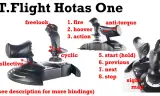
Joystick configuration for the Thrustmaster T.Flight Hotas One, with inverted collective (as in a real helicopter) and with anti-torque on the left hand (the third axis on the stick does nothing). Freelook is as expected on the top-left of the stick. Supports WCS Armament. That is, 'fire' and 'next weapon' will work as expected on the WCS helicopters. Turret up and down is inverted compared to the vanilla configuration, so that aiming as gunner using the joystick feels more natural. Complete list of buttons, as numbered on the joystick: 1. fire 2. hoover 3. action 4. next weapon 5. start engine (hold) 6. select previous 7. select next 8. stop engine 9. reset freelok 10. focus view 13. taxi lights 14. landing lights 15. breaks and under the stick: 11. ("windows" button) deploy sight 12. ("menu" button) map Don't hesitate to mod this in order to support other sticks or adapt to your preferences, this is quite easy and you can test it locally (see https://www.youtube.com/watch?v=C1_2qpGMVL4). As a rule of thumb, the button number is the one written on the joystick minus 1 (e.g. trigger is numbered '1' but is joystick0:button0 in the config, etc.). Also includes settings for the Logitech Extreme 3D Pro with just the collective and turret up/down inverted.