
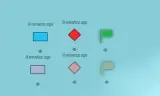
Player-placed map markers gradually fade by lowering opacity if left untouched. Moving a marker restores full visibility.
Players now
3
Servers
2
Rating
-
Subscribers
-
36 downloads
Busiest servers running it 2 in total
All servers


Players on servers with it
daily, last 30 days
Details
- Author
- Splinter_rat
- Version
- 1.0.2
- Size
- 13.6 MB
- Licence
- APL
- Game version
- 1.8.0.10
- Likes
- 0 / 0 dislikes
- Published
- 1 Sep 2026
- Updated
- 1 month ago
- Workshop ID
- 7E4A91C3B8D2560F
Recent adoption
30 days: +1 −0 ↑0
- + [EU]#11 HSC.gg | Conflict Escalation: Advance & Secure 1.0.2 4w ago
- − [EU]#8 HSC.gg | PvE Operations | First Person Only | Discord: HSC.gg 1.0.2 1mo ago
- + [EU]#8 HSC.gg | PvE Operations | First Person Only | Discord: HSC.gg 1.0.2 1mo ago
Often used with
8





Version history
3-
v1.0.2 13.6 MB 1 Sep 2026
Only player-owned custom and military markers are affected (server/briefing markers and map drawings/zones are ignored)
-
v1.0.1 5 KB 1 Sep 2026
-
v1.0.0 5 KB 1 Sep 2026
Description from the Workshop
Marker Fade makes unused map markers look older over time by lowering their opacity (alpha). The original color stays the same — only transparency changes. How it works: - After 1 minute idle, a marker starts fading - Over the next 4 minutes it reaches minimum opacity (default 0.45) - Moving or updating a marker resets the fade - Affects player-owned custom and military markers - Server/briefing markers, map drawings and lobby zone overlays are ignored FAD_FadeGameModeComponent: - Enable / disable - Idle time before fade starts - Fade duration to max transparency - Minimum alpha at max fade Works with these defaults if the component is not added to the GameMode. Useful for distinguishing fresh intel from outdated markers.