
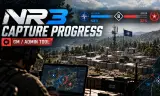
Game Master Capture Progress Overlay for Arma Reforger
Players now
2
Servers
2
Rating
-
Subscribers
-
2 downloads
Busiest servers running it 2 in total
All servers


Players on servers with it
daily, last 30 days
Details
- Author
- NoR3y
- Version
- 1.0.0
- Size
- 2.2 MB
- Licence
- Custom
- Game version
- 1.8.0.13
- Likes
- 0 / 0 dislikes
- Published
- 1 Oct 2026
- Updated
- 2 weeks ago
- Workshop ID
- 6A831DA16CC21F15
Recent adoption
30 days: +4 −2 ↑0
- + [EU1] WindMill Tactical | Realism PvP | NATO/RUS | Before: Dutch Feniks 1.0.0 4d ago
- − Dawn Of The Dead | Horror Arland in Vanilla PvP 1.0.0 5d ago
- + Dawn Of The Dead | Horror Arland in Vanilla PvP 1.0.0 1w ago
- − Dawn Of The Dead | Horror Arland in Vanilla PvP 1.0.0 1w ago
- + Dawn Of The Dead | Horror Arland in Vanilla PvP 1.0.0 1w ago
- + Windmill Tactical | Test Environment 1.0.0 1w ago
Often used with
8

Version history
1-
v1.0.0 2.2 MB 1 Oct 2026
Description from the Workshop
NR3 Capture Progress is a lightweight, standalone mod that allows Game Masters to monitor base capture progress in real time during Conflict scenarios. The mod displays a progress bar directly above capturable bases, showing the base name, capture percentage and current capture status. This gives Game Masters a clear overview of ongoing captures without having to rely on the standard interface. Features Live Capture Progress: Displays the current capture percentage above each active base. Faction Colors: The progress bar uses the capturing faction's color. Contested Status: Displays an orange progress bar when a base is contested. Capture Reset: Shows the progress decreasing when a capture is interrupted. Automatic Visibility: The overlay appears during active captures and disappears when a capture is completed or fully reset. Distance-Based Scaling: The overlay adjusts its size and opacity based on camera distance. Game Master Only: The overlay is visible exclusively in Game Master mode and is hidden when the map is opened. Dedicated Server Support: Capture progress is calculated using server timestamps to maintain consistent timing in multiplayer sessions. Installation Add NR3 Capture Progress to your scenario's mod dependencies. Open your scenario in Arma Reforger Workbench. Add NR3_GMCaptureProgressComponent to the GameMode entity or prefab used by your scenario. Save your changes and launch the scenario. The mod is designed for Conflict scenarios that use the standard Arma Reforger campaign base and capture systems. Important Information This is a visual tool for Game Masters. Regular players do not see the overlay. The mod does not modify capture mechanics, capture times, faction balance or other gameplay systems. No additional mods or frameworks are required. The component must be added to the scenario's GameMode for the overlay to function.