
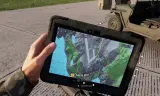
ATAK, +Chat +Feed(Livestreams) +GPS
Players now
4
Servers
31
Rating
88%
26 votes
Subscribers
-
22,579 downloads
Busiest servers running it 31 in total
All servers United States
1.8.0.13
United States
1.8.0.13

 France
1.8.0.13
France
1.8.0.13
 Germany
1.8.0.13
Germany
1.8.0.13
Germany
1.8.0.13
Germany
1.8.0.13
 Netherlands
1.8.0.13
Germany
1.8.0.13
Germany
1.8.0.13
Germany
1.8.0.13
United States
1.8.0.13
Germany
1.8.0.13
Netherlands
1.8.0.13
Germany
1.8.0.13
Germany
1.8.0.13
Germany
1.8.0.13
United States
1.8.0.13
Germany
1.8.0.13
Players on servers with it
daily, last 30 days
Details
- Author
- SkyKingGER
- Version
- 1.0.113
- Size
- 73.8 MB
- Licence
- APL-ND
- Game version
- 1.8.0.13
- Likes
- 0 / 0 dislikes
- Published
- 12 Dec 2025
- Updated
- 1 week ago
- Workshop ID
- 6718FE4BBDA71C7C
Recent adoption
30 days: +33 −43 ↑186
- + [ESP] Grupo Armados Privado 1 Coop/Milsim 1.0.113 5h ago
- + KSK Trainingsgelände 1.0.113 1d ago
- − [MRR] | 1MRB | 1st Marine Raider Battalion | Conflict #1 1.0.113 2d ago
- + [MRR] | 1MRB | 1st Marine Raider Battalion | Conflict #1 1.0.113 2d ago
- + [BR] DIVISION 9 - SERVIDOR MILSIM OFICIAL 1.0.113 3d ago
- − MISFIT | Marine Raider Regiment | 2nd Marine Raider Battalion 1.0.113 4d ago
- ↑ `[FR][EU] | PvP | France VS the World | AMF-FRM-RHS-WCS | dsc.gg/ALAT 1.0.95 1.0.113 4d ago
- − Dead Reckoning | USA Operations [PVE] 1.0.113 4d ago
- + TASK FORCE HOTEL KILO 1.0.113 4d ago
- − ESP [ UrSuS ] [ MILSIM RP. ] [PC, PS, XBOX ]https://discord.gg/VXUmpBsku 1.0.113 5d ago
- − [ITA/EU] BUGS 'N BULLETS | PVP | Console Friendly | bugstheteam.com 1.0.113 5d ago
- + ESP [ UrSuS ] [ MILSIM RP. ] [PC, PS, XBOX ]https://discord.gg/VXUmpBsku 1.0.113 5d ago
Required by
14
Often used with
8






Version history
12-
v1.0.113 73.8 MB 4 Oct 2026
Arc-40 Destruction on Hit
-
v1.0.112 73.8 MB 4 Oct 2026
-
v1.0.111 73.8 MB 4 Oct 2026
-
v1.0.110 73.8 MB 3 Oct 2026
-
v1.0.109 73.8 MB 3 Oct 2026
-
v1.0.108 73.8 MB 3 Oct 2026
Description from the Workshop
🚀 Early Update Release – Open Alpha Phase V1.0.8 I’ve made significant progress and decided to push this update live earlier than planned (original ETA: Feb 14/15). This build is now entering Open Alpha. This means: the core features work, but bugs are part of the experience. The goal right now is testing, feedback, and rapid iteration. 🔧 What’s New New Keybind Menu: Now supports vanilla re-binding. Improved Tablet Brightness: New adjustment method for better visibility. Updated UI: New elements and interface modes. Map Markers: Visuals for your own position and the current cursor/pan location. Functional GPS: The core GPS system is now live. Debug Mode: Added for faster testing via Workbench. Arsenal Integration: Item is now available in the Arsenal. 🧭 Tablet Flow (Current State) Once the tablet is in your inventory, you can power it up and choose between three UI modes: In-hand mode Large Mode (~85% screen) Mini Mode (~40% screen) (Note: Currently, only the GPS mode is fully active.) 🎮 Temporary Keybinds (Testing Only) Ctrl + F1 → Power On / Start / Off / Reset Ctrl + 1 → GPS (Modes 2-4: Chat, Settings, Feed are TODO) Ctrl + F2 → Center map on player Ctrl + F3 → Center & Lock camera to player Page Up / Down → Zoom In / Out Ctrl + Page Up / Down → Adjust Brightness Ctrl + Arrow Keys → Pan map LShift + Q → Mini Mode LShift + E → Big Mode 🐛 Open Alpha = Feedback Needed Bugs are expected! Please report anything unusual and feel free to suggest improvements. Keybinds are a major focus: The current layout is for testing and will likely change—your input here is extremely valuable. Thanks for testing and helping me push this project forward! More features coming soon.