
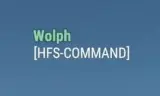
HFS-Custom Nametag Roles is a server-side mod designed for dedicated servers, allowing you to assign custom roles that appear under player names.
Players now
0
Servers
1
Rating
100%
2 votes
Subscribers
-
1,589 downloads
Busiest servers running it 1 in total
All servers
Players on servers with it
daily, last 30 days
Details
- Author
- Cal123
- Version
- 1.0.25
- Size
- 9 KB
- Licence
- APL-ND
- Game version
- 1.6.0.68
- Likes
- 0 / 0 dislikes
- Published
- 21 Sep 2025
- Updated
- 11 months ago
- Workshop ID
- 666AEA0761998033
Recent adoption
30 days: +9 −11 ↑0
- − RP-FR the last project V2 https://discord.gg/wtSg382xQz 1.0.25 41s ago
- + RP-FR the last project V2 https://discord.gg/wtSg382xQz 1.0.25 15m ago
- + K2-14 PMC Server #3 Local 1.0.25 5d ago
- − K2-14 PMC Server #3 Local 1.0.25 5d ago
- + K2-14 PMC Server #3 Local 1.0.25 2w ago
- − K2-14 PMC Server #3 Local 1.0.25 2w ago
- + K2-14 PMC Server #3 Local 1.0.25 2w ago
- − K2-14 PMC Server #3 Local 1.0.25 2w ago
- − (EU/GER) AZ ArmaZon | Modded | Crossplay | 3PP | https://discord.gg/armazon 1.0.25 2w ago
- + (EU/GER) AZ ArmaZon | Modded | Crossplay | 3PP | https://discord.gg/armazon 1.0.25 2w ago
- − Coalition Response Group 1.0.25 3w ago
- − Omega Military RP 1.0.25 3w ago
Often used with
8






Version history
10-
v1.0.25 9 KB 11 Nov 2025
-
v1.0.24 9 KB 11 Nov 2025
-
v1.0.23 8 KB 4 Nov 2025
-
v1.0.22 9 KB 4 Nov 2025
-
v1.0.21 8 KB 6 Oct 2025
-
v1.0.20 8 KB 6 Oct 2025
Description from the Workshop
Created for HeliFlightSchool+ (Feel free to use on your servers) -----Know Conflicts----- If using server admin tools auto login feature, the setrole command will not detect you as a valid admin. You must use #login to become an admin. Thanks to Chaos-_-SOG for letting me know about this. Will not work with CSI mods or any mods that changes a players nametag. Use server commands to set a players role in game. #setrole playername role Example: #setrole cal Admin Player name is not case sensitive, a minimum of 3 characters can be used to find a player. To remove a players role, type #setrole playername remove. User must be an admin to run the commands. Setup Instructions: No complex setup is required. Upon first run, the mod will automatically generate a JSON file inside your server under the Profiles directory. Alternatively, you can manually create a JSON file named CustomRoles.json and place it in your profile directory. CustomRoles.json Example: { "players": [ {"UID": "YOUR GUID HERE", "Role": "YOUR CUSTOM ROLE HERE"}, {"UID": "YOUR GUID HERE", "Role": "YOUR CUSTOM ROLE HERE"} ] } To ensure the mod is functioning correctly, take control of an AI character and view your player. The assigned role should now display under the character’s name. Modifying the scripts in any way is strictly prohibited. If you encounter any issues or need assistance, please contact Cal via Discord: https://discord.gg/m9wWYVhtfm