
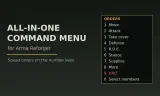
A numbered command menu for your AI squad: move, flank, assault, suppress, take cover, garrison, rearm and more, on the number keys. Reforger port of Leopard20's All-in-One Command Menu.
Players now
1
Servers
4
Rating
100%
2 votes
Subscribers
-
30 downloads
Busiest servers running it 4 in total
All servers United States
1.8.0.13
United States
1.8.0.13
 Finland
1.8.0.13
Finland
1.8.0.13
 China
1.8.0.13
United States
1.8.0.13
China
1.8.0.13
United States
1.8.0.13
Players on servers with it
daily, last 30 days
Details
- Author
- propst81
- Version
- 0.2.1
- Size
- 151 KB
- Licence
- Custom
- Game version
- 1.8.0.13
- Likes
- 0 / 0 dislikes
- Published
- 13 Oct 2026
- Updated
- 1 day ago
- Workshop ID
- 629405AEFC950C12
Recent adoption
30 days: +4 −1 ↑1
- + HEADACHE Finland PVE 0.3.0 1h ago
- − HADES Squadron Flight Operations 0.3.0 6h ago
- ↑ Geeking Squad 0.2.1 0.3.0 20h ago
- + Geeking Squad 0.2.1 1d ago
- + muthur 0.2.1 1d ago
- + Aibuek_lol 0.2.1 1d ago
Often used with
8




Version history
3-
v0.2.1 151 KB 14 Oct 2026
0.2.1 - Public release. Same content as 0.2.0 (vehicles, map commands, garrison fixes).
-
v0.2.0 151 KB 14 Oct 2026
-
v0.1.0 48 KB 13 Oct 2026
Description from the Workshop
AiO Command Menu (Reforger) A fast, numbered command menu for the AI soldiers you lead, in the spirit of Leopard20's All-in-One Command Menu for Arma 3. Press T, then a number or two, and your squad moves, flanks, takes cover or clears a building. No mouse, no wheel. Works anywhere you lead AI: Conflict, Game Master and Arma Commander Actual. Standalone, no other mods needed. Server side and client side: everyone on the server needs it (the Workshop downloads it for them). CONTROLS - T opens and closes the menu (rebind: Settings > Controls > All-in-One Command Menu). - 1-9 pick a line. 0 = Select members on the top page, Back on the others. Backspace = back. - While the menu is open the number keys only drive the menu, so you never switch weapons by accident. - Orders go to the whole squad, or only to the men you pick on Select members (toggle men 1-7, 8 next page, 9 Teams). - Colour teams: Red, Green, Blue, Yellow. Select a team, or put the selected men in one. - Orders that need a place use the spot you are looking at, or the map cursor while the map is open. The menu works with the map open. - While the menu is open a squad bar shows each man's number, health, magazines and current task, and his number floats over his head in his team colour. THE MENU 1 Move: Move here, Follow me, Advance, Stay back, Flank left, Flank right (they keep station about 50 m from you and move with you), Fall back, Hold here, Speed (walk, run, sprint, auto) 2 Attack: Advance, Flank left, Flank right, Assault, Suppress, Fire on my lead, Bound forward, Peel back 3 Vehicles: Get in as driver/gunner/passenger, Switch seat, Get out, Disembark passengers, Eject, Engine and light controls, Unflip 4 Defense: Take cover (each man finds cover facing the threat ahead of you), Garrison building, Clear building, 360 defense, Fortify here 5 R.O.E.: Fire at will, Return fire only, Hold fire, Engage at will, Disengage 6 Stance: Stand, Crouch, Prone, Auto, Copy my stance 7 Supplies: Heal up, Rearm...