
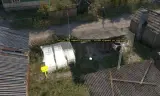
Place Conflict bases and supply sources with confidence: preview where objects will appear and which way the supply storage interaction sign will face.
Players now
0
Servers
0
Rating
100%
1 votes
Subscribers
-
5 downloads
Busiest servers running it 0 in total
No server is running this mod right now.
Players on servers with it
daily, last 30 days
Details
- Author
- true-medoed
- Version
- 1.0.0
- Size
- 10 KB
- Licence
- APL
- Game version
- 1.8.0.13
- Likes
- 0 / 0 dislikes
- Published
- 25 Sep 2026
- Updated
- 3 weeks ago
- Workshop ID
- 5772AF43F501410A
Recent adoption
30 days: +3 −3 ↑0
- − Dawn of Lies | Beta Test Server 1.0.1 2d ago
- + Dawn of Lies | Beta Test Server 1.0.1 4d ago
- − ASC 1.0.0 2w ago
- + ASC 1.0.0 2w ago
- − ASC 1.0.0 2w ago
- + ASC 1.0.0 2w ago
Often used with
8






Version history
1-
v1.0.0 10 KB 25 Sep 2026
Description from the Workshop
Conflict Spawn Helpers shows previews of the compositions that Conflict creates at military bases and supply sources when a mission starts. Use the holograms to leave room for tents, supply storage, and other objects while building your scenario in Workbench. Supported points • ConflictBase_MOB • ConflictControlPoint • ConflictSourceBase_T1Harbor • ConflictSourceBase_T2Harbor • ConflictSourceBase_T3Harbor Features • Shows composition geometry from the world's configured campaign factions before you enter Game mode. • Updates previews when points move or rotate. • Auto uses an ordinary point's default faction. When none is assigned, it reads the INDFOR faction configured in the current Conflict GameMode. • For HQ candidates, Auto shows one composition with the largest rectangular footprint, plus a yellow rectangle enclosing the preview geometry of all available variants. The caption explains that the final composition may occupy less space. • Highlights the construction-supply sign with a solid bright orange material so it is easier to locate. • Lets you toggle previews and cycle through Auto, US, USSR, and FIA without changing the mission's faction assignments. • Cleans up previews when points are deleted and during Edit/Game transitions. Preview geometry has no physics and is not saved as mission objects. • Includes unnamed.ent, a Workbench test world with base points and faction-specific Harbor examples. How to use 1. Load the addon in Workbench and open your Conflict world in World Editor. 2. Make sure the world has a CampaignFactionManager with the required campaign factions and building compositions configured. 3. Place one of the supported points, or inspect points already present in the scenario. Previews are enabled by default for visible points. 4. Open Plugins → [ME] Conflict Spawn Helpers → Toggle Conflict spawn previews to show or hide the helpers. 5. Use Cycle Conflict preview faction (Auto/US/USSR/FIA) to inspect a specific faction's composition. Ma...